September recap: a sandbox without an account, a match page for every player
Hey all. September had more than 220 pull requests. Most of the month went to the people who never open the admin side of Cadre: the player who gets a signup link in Discord, the squad lead checking the brief on a phone, and the clan leader who wants to see the tool before handing it their server.
🧪 Try it without an account
Until now the only way to see Cadre was to log in with Discord and create a clan. That is a lot to ask of someone who just wants to know what the map editor feels like.
app.cadre.gg/demo is a public sandbox. It opens a sample match with a roster, a map plan and a brief, running on the real editor with no account. You can move squads, draw routes, drag players around in the Lineup tab and open the brief your players would see. Nothing is saved, and nobody else sees what you do.
If you like what you built, Keep this plan takes you through the Discord login and the plan you edited becomes your new clan's first playbook. After the Discord login you create the clan right there, without a second login.
📱 A match page for every player
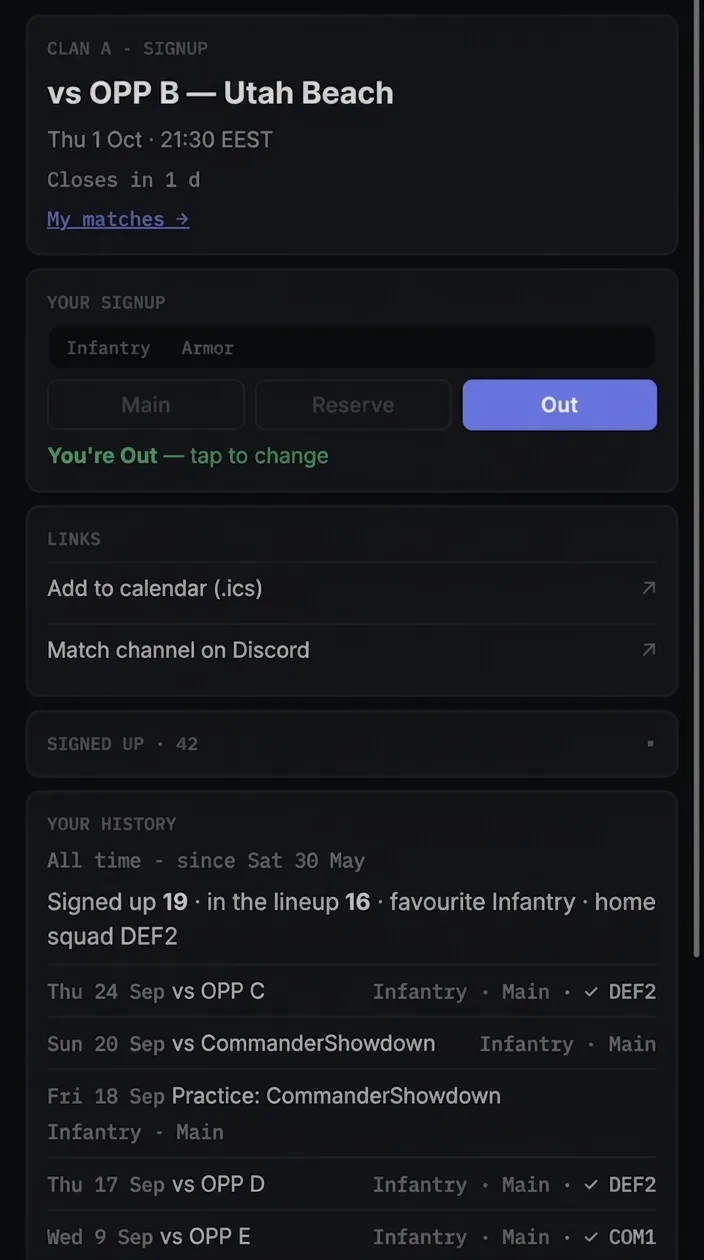
A player's view of a match used to be spread over a Discord embed, a DM and a brief link. Every match now has one page that holds all of it. The signup embed and the reminder DM both link to it, and admins can copy the link from Share without going through the bot.
The page is a stack of cards:
- your signup and the slot you were given, if the lineup is out
- the brief, once it is published
- a calendar link and the match's Discord channel
- your own record: how often you signed up, how often you made the lineup, your usual class and your home squad
- Your form, which compares your recent matches to clanmates who play the same role as you
My matches. Players also get a page listing every upcoming match they are signed up for, across clans. On a phone it installs as its own app, called Cadre Matches, separate from the admin app.
Public signup (Pro). A match can now be opened to anyone with a Discord account, not only your members. Public signups carry a badge in the pool so you can tell them apart when you build the lineup.
🎯 Signups that follow your clan's rules
Plenty of clans run a qualification ladder: you can be fielded once you have passed the entry training, and until then you watch. The rule usually lives in someone's head.
Required roles (Pro). In the signup settings you now pick which Discord roles may sign up. Anyone without one gets a reply only they can see, naming the roles they would need. “Can't make it” is never gated. An unqualified player still has to be able to say they are out, and letting them is harmless.
Reminders for people who have not answered. Opt-in, per clan. Cadre posts in the channel or sends a DM a set number of hours before signups close, only to people who have not responded yet. DMs have a cooldown and players can opt out. Separately, on Pro, once a sign-in brief is up, admins can DM every lineup player who has not opened it yet.
Match channels clean up after themselves. A clan reported that deleting a match in Cadre left its Discord channel behind, and nothing tidied up after a match was over. You now choose what happens once the match is done: leave the channel, move it to an archive category that syncs to that category's permissions, or delete it, after a wait of 1 to 30 days. You can also pick the category a match's channel is created in and give auto-created channels a name prefix. The pre-match reminder can be switched off for matches that do not need one.
⚖️ Practice matches split themselves
Internal practice has always needed someone to sit down and split the clan into two fair teams by hand. Matches now have a practice type, and the Lineup has a Split view for it.
Cadre ranks the players who signed up by a level you set, by their imported stats, or by a mix of both, and proposes two teams. There are a few methods, from a snake draft to plain random. It shows the class balance on each side and flags where one team has three tank crews and the other has none. You can lock players to a side before re-running it. When you write the split to the lineups, Cadre creates the Team B match and writes both lineups, and a Team A / Team B switch in the Lineup moves between them. All of it works on a phone.
🗺️ Briefs that tell you who to talk to
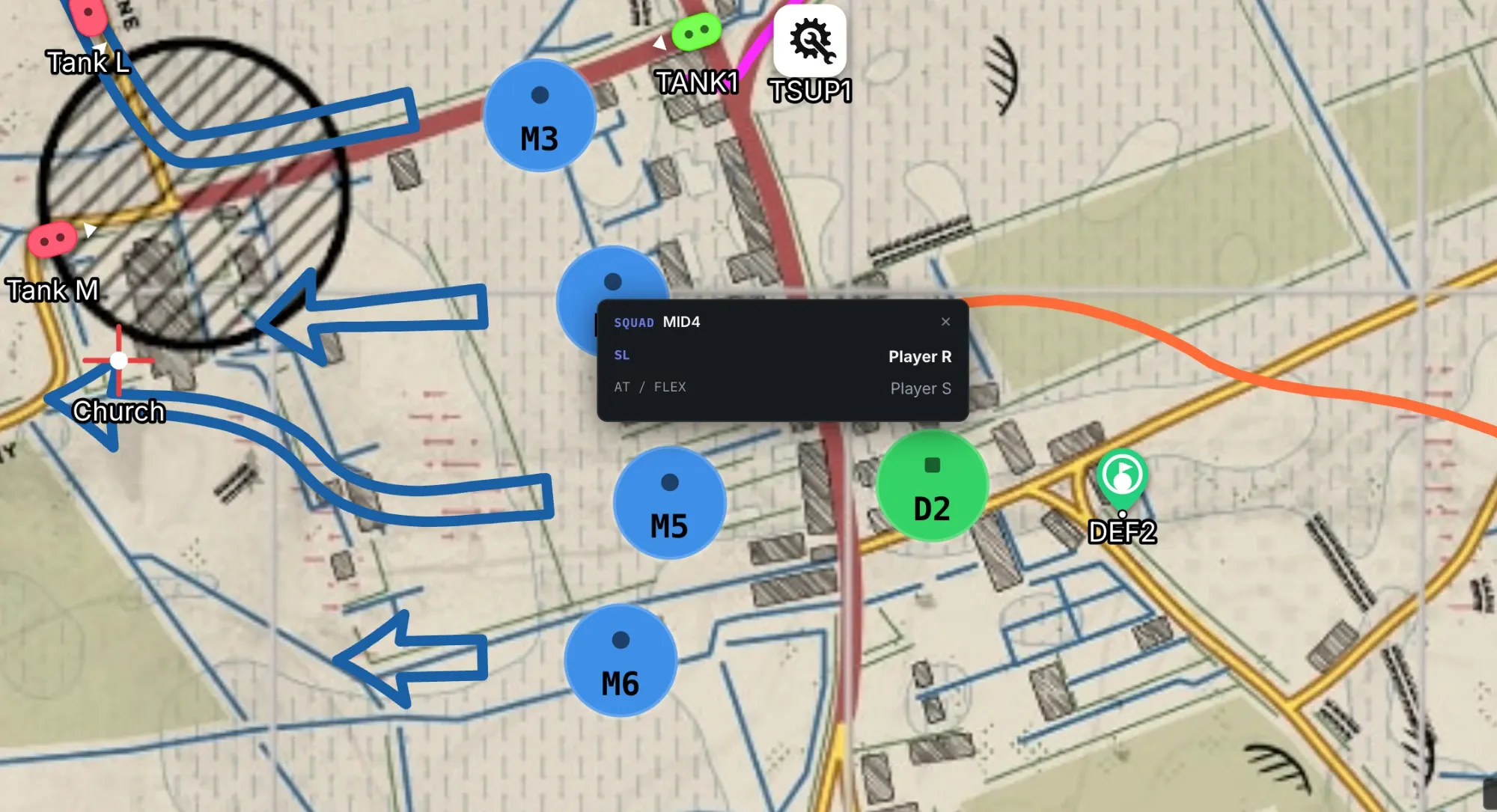
- In a brief, squad markers show their squad leader's name. If the brief includes the squad lineup, tapping a marker opens the squad roster, leader first.
- The For you callout at the top of a brief now lists the squad leaders positioned near your squad, which is who you will be calling on comms.
- Last week's plan, offered back. Open an empty plan on the same map, side and middle point as an earlier match and Cadre offers that plan as a starting point.
- Every save keeps a snapshot of the plan, so an older version can be restored.
- Annotate has a callout tool: a boxed label with an arrow to a point. Screenshots in a brief can be pinch-zoomed and panned on a phone, and turned to landscape with one tap.
- The mobile app has a new bottom bar with three tabs: Matches, War Room and More.
📊 War Room: scouting and player development
If your server runs CRCON, Cadre records the public sessions on it. In September that data started working for recruitment and for coaching your own people.
Scout gives every regular it has seen on your server a Recruit score built from three parts: Skill, Teamplay and Presence. Admins pick how much each part weighs, from presets or by hand. A player's detail view shows when they are usually online, who they tend to squad with and a radar of the roles they play. In the Scout list, matches, K/D and KPM follow whatever time window you choose.
Development is the same lens pointed at your own members: a role profile, how someone plays on public servers compared to your competitive matches, a trend over the window you pick, and goals you can set with them.
🔒 Under the hood
The end of September went to a security review of the whole codebase. Most of what came out of it is invisible when it works:
- Tighter permission checks throughout the app.
- Account deletion and data export are more thorough.
- Discord signup buttons respond more reliably.
- A long list of smaller fixes, plus a search box on the War Room roster.
Quick answers
Can I try Cadre without creating an account?
Yes. The sandbox at app.cadre.gg/demo opens a sample Hell Let Loose match with its roster, map plan and brief. You can edit all of it, and nothing is saved.
Can I limit who can sign up for a Hell Let Loose match in Discord?
Yes. In the signup settings you pick the Discord roles that may sign up. Players without one of them get a reply only they can see, naming the roles they need. Anyone can still answer "Can't make it".
How do I split a practice match into two even teams?
Create the match as a practice match, collect signups as usual, and open Split in the Lineup. Cadre proposes two teams balanced by player level, stats or both, shows the class balance, and creates the Team B match for you.
What's next
More of the player side: the match page and My matches are the first things many players will ever see of Cadre, and they should be as good as the editor.
As always, most of this started as a message in our Discord saying some part of the tool was annoying. Keep them coming. If you run a Hell Let Loose clan, the quickest way to see whether Cadre fits is the sandbox. When you want the real thing, it is at app.cadre.gg.
Previously: August recap · After Action, tournament rosters & a smarter staff channel